Showing posts with label Web. Show all posts

Wednesday, February 4, 2009

CAPTCHA and proposed alternative, SAPTCHA

Introduction

(skip to next section if you are familiar with concept of CAPTCHA)

CAPTCHA stands for Completely Automated Public Turing Test to Tell Computers and Humans Apart. [Wikipedia / Captcha]

Simply put, CAPTCHA is a set of methods commonly used to block automated account registration and similar massive abuse by making it costlier to spammer. Most common type of CAPTCHA is visual CAPTCHAs that test for image recognition. Though, at current moment, computers (using good software) is no worse than humans at single character image recognition (source) (fortunately spammers don't bother to use such software yet.)

Most likely you have already been tested by CAPTCHAs - that's those images od distorted and obstructed letters that you must enter into text field to complete registration of email account or to post reply to blog.

Verbal CAPTCHA would not discriminate against vision impaired, but computer will only be able to generate very limited subset of questions and thus it would be relatively simple to defeat such CAPTCHA. Audio CAPTCHAs is uncommon because one would still need visual one and it would double effort.


CAPTCHAs has numerous problems(see wikipedia article linked above for good overview); there is existing methods of character recognition, plus it is often possible to defeat captcha knowing the algorithm it uses.

Intuitively, while computers is not smart enough to pass true Turing test, computers may be smart enough to fool other computers.

In some CAPTCHAs, the image is obscured in a way that makes it harder to read for human, but will have no effect on computer - for example, computer won't have any problem at all filtering out colored background, but it can confuse human(especially colorblind).

Often, human don't know how many letters should be there, and random lines may look like yet another distorted letter, confusing human but not computer that knows how many letters should be there. Some letters in common fonts differ too little to be reliably recognized by human when distorted (such as 0,O ; I,l,i,!,j ; vv,w and so on). Humans recognize heavily distorted letters in handwriting based on the context, but letters in CAPTCHAs lack context.Last but not least, such methods unnecessarily discriminate against disabled who can not see the image.

SAPTCHA.

SAPTCHA stands for Semi Automatic Public Turing Test to Tell Computers and Humans Apart.

The key concept is same as with CAPTCHA: user is presented with test question or instructions and must give correct answer to use resource. Main difference is that computer does not try to automatically generate "unique" test questions on each query; only verification of answer is automatic. Instead, unique test question and answer[s] is set by moderator or owner when SAPTCHA is installed, and should be easy to change if needed.

SAPTCHA is proposed as more accessible alternative to CAPTCHA that may replace CAPTCHA in services such as most blogs and forums. SAPTCHA works as lightweight CAPTCHA.

The concept follows from observation that there is many cases where automated generation of unique test question or image does not add much to prevention of abuse - spammer do not need to pass test more than once on same forum or blog anyway. Often, there's no human spammer interacting with website at all [who wouldn't love to think that his site is so important that it is spammed personally :-)]; in such cases static question is not worse at stopping bot than dynamic. Human generated questions has much broader diversity and is thus harder for computer to answer. It must be also noted that CAPTCHA itself is not really "completely automatic" - human has to write and maintain test software, which will not change often but is costly to develop.

Example questions: User is given instruction like "write [no i'm not a computer!] in this text field" or "write 'i'm human' in reverse" or "write[or copy-paste] web address of this page there" (please don't use too similar things. No default questions and answers. Think up something yourself. Don't try to be clever. It should be not more complex to understand and do than rest of registration instruction and resource usage, and thus shouldn't decrease website's accessability(!). It's better if answer is more than 1 character long or if there is delay or block for bots that "try again".)

Bots can try to understand text written by human in normal language (very hard problem in AI) or try to guess (some delay can make it pointless) or try some common test answers if any (but the common test questions and answers will quickly disappear)

Spammer have to manually answer the question to start spamming. This is exactly same problem as with CAPTCHA at registration. Similarly to CAPTCHA at registration, human invervention is necessary to stop spam. - account must be banned and for SAPCHA question must be changed(if bot can reuse answer automatically).

In a way, SAPTCHA can be viewed as light weight disposable CAPTCHA test that is cheap to replace when it get compromised.

Comparison

Sample use scenarios

SAPTCHA

s.0) Normal user comes accross your blog. If he can answer question, he can post reply, unless you made bad question/instructions. If user can't read your question, probably he can't read your blog either, so the SAPTCHA shouldn't make it less accessible.

s.1) Spammer bot comes accross your blog. No spamming happens. Bots can't understand human language yet.

s.2) Spammer human comes accross your blog/forum, answer question, register account, and possibly add answer and account to spambot database or proceeds to spam manually. You are spammed. It will take a moderator to ban spammer and stop spam; the banning form may also ask moderator for new question and new answer that needs to be provided if spamming was done by bot that "knows" answer to question.

CAPTCHA

s.0) Normal user comes accross your blog/forum. If he can see, and CAPTCHA is simple he can post reply with small hastle if he doesn't have to pass CAPTCHA every time he replies. If CAPTCHA is "unbreakable" or uses bad colors, he will need few tries and is going to get annoyed, especially so if he need to pass it for every reply. If he is blind or otherwise can't see it, no way.

s.1) Spammer bot comes accross your blog. You might get spammed if bot can recognize image (it is possible if you are using popular CAPTCHA), but most likely you won't.

s.2) Spammer human comes accross your blog/forum. He can answer question, register account, add it to spambot database. You are spammed. It will take moderator to ban the bot, and delete spam[assuming that spam filters alone don't suffice without CAPTCHA]; so you still need human intervention from your side. As have been said before, if you'd ask to pass CAPTCHA for every message it'd be too annoying for normal users as well.

Comparison of SAPTCHA versus CAPTCHA features

Advantages of SAPTCHA over CAPTCHA:

  1. SAPTCHA software is much easier to implement than CAPTCHA
  2. Textual SAPTCHA does not discriminate against disabled who can use internet. [Audio CAPTCHA plus visual CAPTCHA would double effort and is thus very uncommon in practice]
  3. There is methods for breaking image based CAPTCHAs. If you use popular CAPTCHA, you may still get spammed by entirely automatic bot. SAPTCHAs can be much more varied and there won't be common method of breaking until it becomes possible for computers to interpret human instructions in normal human language.
Advantages of CAPTCHA over SAPTCHA (disadvantages of SAPTCHA):

  1. With SAPTCHA, when banning spammer, moderator must enter new question and answer. With CAPTCHA, though, there's point 1 above (& CAPTCHA code won't remain useful forever either), so for not extremely popular websites it seems highly unlikely that even in long run CAPTCHA would save work.
  2. If SAPTCHA is used to protect registration, it is easier to register many accounts at once than with CAPTCHA; may matter with popular email services.
  3. Verbal SAPTCHA is problematic when it is multi-language resource that needs frequent changes.
  4. When it is something like photo gallery, visual CAPTCHA is allright as it doesn't contribute to inaccessability.

Conclusion:

SAPTCHA can be viable alternative to CAPTCHA for web resources like forums and blogs and in other situations when spammer can not afford to target resources individually. With textual resources, SAPTCHA does not lessen accessability of resource.

It is suggested that forum and blogging software should offer support for SAPTCHA in addition to existing support for CAPTCHA, thus allowing administrator to use SAPTCHA and switch to CAPTCHA only when and if SAPTCHA is found to be really inadequate in this situation (which is expected to happen only on very popular web resources). By the method of operation, SAPTCHA can give only limited protection against account registration abuses when abuser is willing to solve SAPTCHA and consequently run bot that register really many accounts (e.g. for use of email as storage), which would be prevented by CAPTCHA on every registration.

Live example of question

John had one thousand apples and five oranges. He ate as many of his apples as there is letters in word "apple". Also he ate two bananas :-). How many appl es John have?

Your answer:


If you are annoyed by CAPTCHA, think about alternatives and discuss concept of SAPTCHA with others. Make the best meme win.

Source: http://dmytry.pandromeda.com/

Tuesday, June 3, 2008

Windows, Linux, and Mac Hosts File Modifications

Overview

Palace servers periodically try to connect to a directory server that is no longer there. With Unix and Linux servers, this results in nothing more than a few extra log entries. However, Windows and Mac servers can experience some lag when the server is trying to make this connection. To eliminate lag from this source, and to be listed on the new Live Directory at Palacetools.com, you can create or modify a Hosts file.

Windows

  • Locate the file "Hosts" on your computer:

    Windows 95/98/Me  c:\windows\hosts
    Windows NT/2000/XP Pro  c:\winnt\system32\drivers\etc\hosts
    Windows XP Home c:\windows\system32\drivers\etc\hosts

    (you may need administrator access for Windows NT/2000/XP)

    NOTE: Hosts is the name of the hosts file and not another directory name. It does not have an extension (extensions are the .exe, .txt, .doc, etc. endings to filenames) and so appears to be another directory in the example above.

    You may have a file called "Hosts.sam". This file is a sample Hosts file (the .sam stands for sample) and can be used by removing the .sam extension so the name is just "Hosts". This file should be edited with a text editor, such as Notepad, and not a word processor, such as Microsoft Word. Use whatever you normally use to edit your cyborg.ipt or pserver.pat file.
  • Add this line to the Hosts file:
    71.155.186.91     directory.thepalace.com
  • Save your changes.
  • Reboot your computer.
  • Your server should now "register" with the Live Directory at palacetools.com.

  • If your Hosts file already contains an entry for directory.thepalace.com, then remove that entry. The above entry would be used in place of, and not in addition to any other directory.thepalace.com entry.

    NOTE: Windows users should verify that they are showing extensions for all file types. This will help verify that the Hosts file is named correctly. To reset Windows to show all file extensions, double click on My Computer. Go to View Menu (Win95/98/ME) or Tools Menu (Win2000/XP), and select Folder Options. Click the View tab. In the Files and Folders section, DESELECT (uncheck) the item named "Hide file extensions for known file types". Click Apply, and then click OK.

Linux

  • Edit the hosts file on your system. The hosts file is usually found in

    /etc/hosts  
  • Add this entry to the Hosts file:
    71.155.186.91     directory.thepalace.com  
  • Now make sure this file is used for host name lookups. This is done in two files. First is:
    /etc/host.conf  

    This file should have at least the line shown below:

    order hosts,bind  

    That has host lookups use the hosts file before doing a DNS query with bind.

  • The next file is:
    /etc/nsswitch.conf  

    Recent tests indicate that this file is required in order for the pserver to use the entry in /etc/hosts. The nsswitch.conf file should have this line for the hosts configuration:

    hosts:      files nisplus nis dns  

    There will probably already be a similar line in your version of this file. Just make sure "files" comes before whatever other methods are listed.

  • There is no need to reboot your system. Just restart your palace pservers.

  • Start up your palace.

  • It should now "register" with the Live Directory at palacetools.com.

    NOTE: The above configuration instructions were tested with a linux 4.5.1 Palace server, and should also work with the linux 4.4.1 server. The 4.3.2 linux server did not respond to the above configuration when tested. Older versions were not tested.

Macintosh OS X

  • With Macintosh OS X, the procedure is similar to Linux above. The hosts file can be found in

    /etc/hosts  

Macintosh OS 9

  • Look in System Folder:Preferences, and in the System Folder itself, and see if you have a file named "Hosts". If not, create one in a text editor.
  • Add these entries to the Hosts file:
    paps.thepalace.com          A    127.0.0.1  
    directory.thepalace.com A 71.155.186.91
  • Spaces should work, but it is recommended that you separate the three entries on each line by tabs. The first line is the one that makes sure your downloads work, and the second line is the one that redirects your server's reporting information. Place the Hosts file in System Folder:Preferences and reboot your Mac. Start up your palace. It should now "register" with the Live Directory at palacetools.com.

    If you have an older Mac that is using MacTCP instead of Open Transport, try putting the Hosts file in the System Folder.

  • Note from the Apple Tech Info Library:

      Open Transport TCP/IP automatically uses a Hosts file stored the Preferences folder of the active System Folder. If no Hosts file is found in the Preferences folder, Open Transport TCP/IP searches the active System Folder for a Hosts file.

    This means that if you don't already have a Hosts file, and you just drop it in your System Folder and reboot, it will work. However, System Folder:Preferences is the default and recommended location for all systems using Open Transport.

    Additional Configuration Options

  • You can configure TCP/IP to use the contents of this new Hosts file, which will activate the Hosts file without having to reboot.

    To do this:

    • Open the TCP/IP control panel.
    • Get into Advanced user mode by:
      • selecting the User Mode command under the Edit menu.
      • In the User Mode dialog select Advanced then click OK.
    • Click on the Select Hosts File button.
    • In the File Open file dialog that comes up, naviagate to and select the Hosts file you created.
    • Click on OK if it asks you if you are sure you want to replace the Hosts File with the contents of the selected file.
    • Close TCP/IP control panel and click OK to save the configuration.

    The above procedure will copy the contents of the file selected into the Hosts file in the Preferences folder, or create one there if none exists.

Saturday, May 3, 2008

Web 3.0

Web 3.0

From Wikipedia, the free encyclopedia

Web 3.0 is a term used to describe the future of the World Wide Web. Following the introduction of the phrase "Web 2.0" as a description of the recent evolution of the Web, many technologists, journalists, and industry leaders have used the term "Web 3.0" to hypothesize about a future wave of Internet innovation.

Views on the next stage of the World Wide Web's evolution vary greatly. Some believe that emerging technologies such as the Semantic Web will transform the way the Web is used, and lead to new possibilities in artificial intelligence. Other visionaries suggest that increases in Internet connection speeds, modular web applications, or advances in computer graphics will play the key role in the evolution of the World Wide Web.

Views of industry leaders

In May 2006, Tim Berners-Lee, inventor of the World Wide Web stated:

People keep asking what Web 3.0 is. I think maybe when you've got an overlay of scalable vector graphics - everything rippling and folding and looking misty - on Web 2.0 and access to a semantic Web integrated across a huge space of data, you'll have access to an unbelievable data resource.

Tim Berners-Lee, http://www.iht.com/articles/2006/05/23/business/web.php A 'more revolutionary' Web


At the Seoul Digital Forum in May 2007, Eric Schmidt, CEO of Google, was asked to define Web 2.0 and Web 3.0. He responded:

Web 2.0 is a marketing term, and I think you've just invented Web 3.0.
But if I were to guess what Web 3.0 is, I would tell you that it's a different way of building applications... My prediction would be that Web 3.0 will ultimately be seen as applications which are pieced together. There are a number of characteristics: the applications are relatively small, the data is in the cloud, the applications can run on any device, PC or mobile phone, the applications are very fast and they're very customizable. Furthermore, the applications are distributed virally: literally by social networks, by email. You won't go to the store and purchase them... That's a very different application model than we've ever seen in computing.

Eric Schmidt


At the Technet Summit in November 2006, Jerry Yang, founder and Chief of Yahoo, stated:

Web 2.0 is well documented and talked about. The power of the Net reached a critical mass, with capabilities that can be done on a network level. We are also seeing richer devices over last four years and richer ways of interacting with the network, not only in hardware like game consoles and mobile devices, but also in the software layer. You don't have to be a computer scientist to create a program. We are seeing that manifest in Web 2.0 and 3.0 will be a great extension of that, a true communal medium…the distinction between professional, semi-professional and consumers will get blurred, creating a network effect of business and applications.

Jerry Yang


At the same Technet Summit, Reed Hastings, founder and CEO of Netflix, stated a simpler formula for defining the phases of the Web:

Web 1.0 was dial-up, 50K average bandwidth, Web 2.0 is an average 1 megabit of bandwidth and Web 3.0 will be 10 megabits of bandwidth all the time, which will be the full video Web, and that will feel like Web 3.0.

Reed Hastings


Innovations associated with "Web 3.0"

Web-based applications and desktops

Web 3.0 technologies, such as intelligent software that utilize semantic data, have been implemented and used on a small scale by multiple companies for the purpose of more efficient data manipulation. In recent years, however, there has been an increasing focus on bringing semantic web technologies to the general public.

Web 3.0 debates

There is considerable debate as to what the term Web 3.0 means, and what a suitable definition might be.

Transforming the Web into a database

The first step towards a "Web 3.0" is the emergence of "The Data Web" as structured data records are published to the Web in reusable and remotely queryable formats, such as XML, RDF, ICDL and microformats. The recent growth of SPARQL technology provides a standardized query language and API for searching across distributed RDF databases on the Web. The Data Web enables a new level of data integration and application interoperability, making data as openly accessible and linkable as Web pages. The Data Web is the first step on the path towards the full Semantic Web. In the Data Web phase, the focus is principally on making structured data available using RDF. The full Semantic Web stage will widen the scope such that both structured data and even what is traditionally thought of as unstructured or semi-structured content (such as Web pages, documents, etc.) will be widely available in RDF and OWL semantic formats. Website parse templates will be used by Web 3.0 crawlers to get more precise information about web sites' structured content.

An evolutionary path to artificial intelligence

Web 3.0 has also been used to describe an evolutionary path for the Web that leads to artificial intelligence that can reason about the Web in a quasi-human fashion. Some skeptics regard this as an unobtainable vision. However, companies such as IBM and Google are implementing new technologies that are yielding surprising information such as making predictions of hit songs from mining information on college music Web sites. There is also debate over whether the driving force behind Web 3.0 will be intelligent systems, or whether intelligence will emerge in a more organic fashion, from systems of intelligent people, such as via collaborative filtering services like del.icio.us, Flickr and Digg that extract meaning and order from the existing Web and how people interact with it.

The realization of the Semantic Web and SOA

Related to the artificial intelligence direction, Web 3.0 could be the realization and extension of the Semantic web concept. Academic research is being conducted to develop software for reasoning, based on description logic and intelligent agents. Such applications can perform logical reasoning operations using sets of rules that express logical relationships between concepts and data on the Web.
Sramana Mitra differs on the viewpoint that Semantic Web would be the essence of the next generation of the Internet and proposes a formula to encapsulate Web 3.0.
Web 3.0 has also been linked to a possible convergence of Service-oriented architecture and the Semantic web.
Web 3.0 is also called the "Internet of Services", i.e. besides the human readable part of the web there will be machine accessible SOA services which can be combined/orchestrated to higher level of services.

Evolution towards 3D

Another possible path for Web 3.0 is towards the 3 dimensional vision championed by the Web3D Consortium. This would involve the Web transforming into a series of 3D spaces, taking the concept realised by Second Life further. This could open up new ways to connect and collaborate using 3D shared spaces.

Web 3.0 as an "Executable" Web Abstraction Layer

Where Web 1.0 was a "read-only" web, with content being produced by and large by the organizations backing any given site, and Web 2.0 was an extension into the "read-write" web that engaged users in an active role, Web 3.0 could extend this one step further by allowing people to modify the site or resource itself. With the still exponential growth of computer power, it is not inconceivable that the next generation of sites will be equipped with the resources to run user-contributed code on them.[citation needed] The "executable web" can morph online applications into Omni Functional Platforms that deliver a single interface rather than multiple nodes of functionality.

Web 3.0 as it relates to socio-technological values

The inclusion of the concept of a Web 0.0 as a pre-existing "real-world" sensual web has been proposed. In that context Web 3.0 is the end of a loop where integration of technologies for digital networking and processing is digested and non dissociable of the new "real-world". In this definition, Web 3.0 is "the biological, digital analog web where information is made of a plethora of digital values coalesced for sense and linked to the real-world by analog interfaces."

Proposed expanded definition

Nova Spivack defines Web 3.0 as the third decade of the Web (2010–2020) during which he suggests several major complementary technology trends will reach new levels of maturity simultaneously including:

  • transformation of the Web from a network of separately siloed applications and content repositories to a more seamless and interoperable whole.
  • ubiquitous connectivity, broadband adoption, mobile Internet access and mobile devices;
  • network computing, software-as-a-service business models, Web services interoperability, distributed computing, grid computing and cloud computing;
  • open technologies, open APIs and protocols, open data formats, open-source software platforms and open data (e.g. Creative Commons, Open Data License);
  • open identity, OpenID, open reputation, roaming portable identity and personal data;
  • the intelligent web, Semantic Web technologies such as RDF, OWL, SWRL, SPARQL, GRDDL, semantic application platforms, and statement-based datastores;
  • distributed databases, the "World Wide Database" (enabled by Semantic Web technologies); and
  • intelligent applications, natural language processing., machine learning, machine reasoning, autonomous agents.

Thursday, November 1, 2007

What Is Web 2.0

Design Patterns and Business Models for the Next Generation of Software

The bursting of the dot-com bubble in the fall of 2001 marked a turning point for the web. Many people concluded that the web was overhyped, when in fact bubbles and consequent shakeouts appear to be a common feature of all technological revolutions. Shakeouts typically mark the point at which an ascendant technology is ready to take its place at center stage. The pretenders are given the bum's rush, the real success stories show their strength, and there begins to be an understanding of what separates one from the other.
The concept of "Web 2.0" began with a conference brainstorming session between O'Reilly and MediaLive International. Dale Dougherty, web pioneer and O'Reilly VP, noted that far from having "crashed", the web was more important than ever, with exciting new applications and sites popping up with surprising regularity. What's more, the companies that had survived the collapse seemed to have some things in common. Could it be that the dot-com collapse marked some kind of turning point for the web, such that a call to action such as "Web 2.0" might make sense? We agreed that it did, and so the Web 2.0 Conference was born.
In the year and a half since, the term "Web 2.0" has clearly taken hold, with more than 9.5 million citations in Google. But there's still a huge amount of disagreement about just what Web 2.0 means, with some people decrying it as a meaningless marketing buzzword, and others accepting it as the new conventional wisdom.
This article is an attempt to clarify just what we mean by Web 2.0.
In our initial brainstorming, we formulated our sense of Web 2.0 by example:
Web 1.0Web 2.0
DoubleClick-->Google AdSense
Ofoto-->Flickr
Akamai-->BitTorrent
mp3.com-->Napster
Britannica Online-->Wikipedia
personal websites-->blogging
evite-->upcoming.org and EVDB
domain name speculation-->search engine optimization
page views-->cost per click
screen scraping-->web services
publishing-->participation
content management systems-->wikis
directories (taxonomy)-->tagging ("folksonomy")
stickiness-->syndication
The list went on and on. But what was it that made us identify one application or approach as "Web 1.0" and another as "Web 2.0"? (The question is particularly urgent because the Web 2.0 meme has become so widespread that companies are now pasting it on as a marketing buzzword, with no real understanding of just what it means. The question is particularly difficult because many of those buzzword-addicted startups are definitely not Web 2.0, while some of the applications we identified as Web 2.0, like Napster and BitTorrent, are not even properly web applications!) We began trying to tease out the principles that are demonstrated in one way or another by the success stories of web 1.0 and by the most interesting of the new applications.

1. The Web As Platform

Like many important concepts, Web 2.0 doesn't have a hard boundary, but rather, a gravitational core. You can visualize Web 2.0 as a set of principles and practices that tie together a veritable solar system of sites that demonstrate some or all of those principles, at a varying distance from that core.

Web2MemeMap

Figure 1 shows a "meme map" of Web 2.0 that was developed at a brainstorming session during FOO Camp, a conference at O'Reilly Media. It's very much a work in progress, but shows the many ideas that radiate out from the Web 2.0 core.
For example, at the first Web 2.0 conference, in October 2004, John Battelle and I listed a preliminary set of principles in our opening talk. The first of those principles was "The web as platform." Yet that was also a rallying cry of Web 1.0 darling Netscape, which went down in flames after a heated battle with Microsoft. What's more, two of our initial Web 1.0 exemplars, DoubleClick and Akamai, were both pioneers in treating the web as a platform. People don't often think of it as "web services", but in fact, ad serving was the first widely deployed web service, and the first widely deployed "mashup" (to use another term that has gained currency of late). Every banner ad is served as a seamless cooperation between two websites, delivering an integrated page to a reader on yet another computer. Akamai also treats the network as the platform, and at a deeper level of the stack, building a transparent caching and content delivery network that eases bandwidth congestion.
Nonetheless, these pioneers provided useful contrasts because later entrants have taken their solution to the same problem even further, understanding something deeper about the nature of the new platform. Both DoubleClick and Akamai were Web 2.0 pioneers, yet we can also see how it's possible to realize more of the possibilities by embracing additional Web 2.0 design patterns.
Let's drill down for a moment into each of these three cases, teasing out some of the essential elements of difference.

Netscape vs. Google

If Netscape was the standard bearer for Web 1.0, Google is most certainly the standard bearer for Web 2.0, if only because their respective IPOs were defining events for each era. So let's start with a comparison of these two companies and their positioning.
Netscape framed "the web as platform" in terms of the old software paradigm: their flagship product was the web browser, a desktop application, and their strategy was to use their dominance in the browser market to establish a market for high-priced server products. Control over standards for displaying content and applications in the browser would, in theory, give Netscape the kind of market power enjoyed by Microsoft in the PC market. Much like the "horseless carriage" framed the automobile as an extension of the familiar, Netscape promoted a "webtop" to replace the desktop, and planned to populate that webtop with information updates and applets pushed to the webtop by information providers who would purchase Netscape servers.
In the end, both web browsers and web servers turned out to be commodities, and value moved "up the stack" to services delivered over the web platform.
Google, by contrast, began its life as a native web application, never sold or packaged, but delivered as a service, with customers paying, directly or indirectly, for the use of that service. None of the trappings of the old software industry are present. No scheduled software releases, just continuous improvement. No licensing or sale, just usage. No porting to different platforms so that customers can run the software on their own equipment, just a massively scalable collection of commodity PCs running open source operating systems plus homegrown applications and utilities that no one outside the company ever gets to see.
At bottom, Google requires a competency that Netscape never needed: database management. Google isn't just a collection of software tools, it's a specialized database. Without the data, the tools are useless; without the software, the data is unmanageable. Software licensing and control over APIs--the lever of power in the previous era--is irrelevant because the software never need be distributed but only performed, and also because without the ability to collect and manage the data, the software is of little use. In fact, the value of the software is proportional to the scale and dynamism of the data it helps to manage.
Google's service is not a server--though it is delivered by a massive collection of internet servers--nor a browser--though it is experienced by the user within the browser. Nor does its flagship search service even host the content that it enables users to find. Much like a phone call, which happens not just on the phones at either end of the call, but on the network in between, Google happens in the space between browser and search engine and destination content server, as an enabler or middleman between the user and his or her online experience.
While both Netscape and Google could be described as software companies, it's clear that Netscape belonged to the same software world as Lotus, Microsoft, Oracle, SAP, and other companies that got their start in the 1980's software revolution, while Google's fellows are other internet applications like eBay, Amazon, Napster, and yes, DoubleClick and Akamai.

Tuesday, August 21, 2007

Web service

A 'Web service' (also Web Service) is defined by the W3C as "a software system designed to support interoperable Machine to Machine interaction over a network." Web services are frequently just Web APIs that can be accessed over a network, such as the Internet, and executed on a remote system hosting the requested services.

Web services architecture

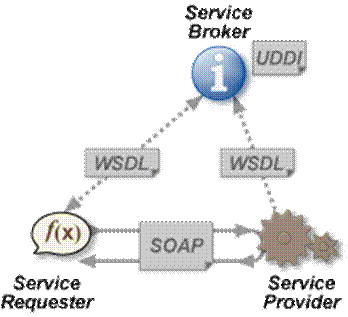
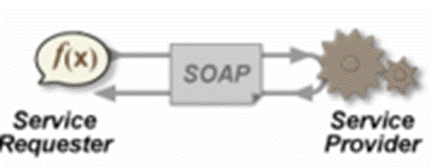
The W3C Web service definition encompasses many different systems, but in common usage the term refers to clients and servers that communicate using XML messages that follow the SOAP standard. Common in both the field and the terminology is the assumption that there is also a machine readable description of the operations supported by the server written in the Web Services Description Language (WSDL). The latter is not a requirement of a SOAP endpoint, but it is a prerequisite for automated client-side code generation in many Java and .NET SOAP frameworks (frameworks such as Spring and Apache CXF being notable exceptions). Some industry organizations, such as the WS-I, mandate both SOAP and WSDL in their definition of a Web service.

Specifications

Profiles

To improve interoperability of Web Services, the WS-I publishes profiles. A profile is a set of core specifications (SOAP, WSDL, ...) in a specific version (SOAP 1.1, UDDI 2, ...) with some additional requirements to restrict the use of the core specifications. The WS-I also publishes use cases and test tools to help deploying profile compliant Web Service.

Additional specifications, WS

Some specifications have been developed or are currently being developed to extend Web Services capabilities. These specifications are generally referred to as WS-*. Here is a non-exhaustive list of these WS-* specifications.

WS-Security
     Defines how to use XML Encryption and XML Signature in SOAP to secure message exchanges, as an alternative or extension to using HTTPS to secure the channel.

WS-Reliability
     An OASIS standard protocol for reliable messaging between two Web services.

WS-ReliableMessaging 
     A protocol for reliable messaging between two Web services, issued by Microsoft, BEA and IBM it is currently being standardized by the OASIS organization.

WS-Addressing
     A way of describing the address of the recipient (and sender) of a message, inside the SOAP message itself.

WS-Transaction
     A way of handling transactions.

Some of these additional specifications have come from the W3C. There is much discussion around the organization's participation, as the general Web and the Semantic Web story appear to be at odds with much of the Web Services vision. This has surfaced most recently in February 2007, at the Web of Services for the Enterprise workshop. Some of the participants advocated a withdrawal of the W3C from further WS-* related work, and a focus on the core Web.

In contrast, OASIS has standardized many Web service extensions, including Web Services Resource Framework and WSDM.

Styles of use

Web services are a set of tools that can be used in a number of ways. The three most common styles of use are RPC, SOA and REST.

Remote procedure calls

Architectural elements involved in the XML-RPC.

Architectural elements involved in the XML-RPC.

RPC Web services present a distributed function (or method) call interface that is familiar to many developers. Typically, the basic unit of RPC Web services is the WSDL operation.
The first Web services tools were focused on RPC, and as a result this style is widely deployed and supported. However, it is sometimes criticised for not being loosely coupled, because it was often implemented by mapping services directly to language-specific functions or method calls. Many vendors felt this approach to be a dead end, and pushed for RPC to be disallowed in the WS-I Basic Profile.

Service-oriented architecture

Web services can also be used to implement an architecture according to Service-oriented architecture (SOA) concepts, where the basic unit of communication is a message, rather than an operation. This is often referred to as "message-oriented" services.

SOA Web services are supported by most major software vendors and industry analysts. Unlike RPC Web services, loose coupling is more likely, because the focus is on the "contract" that WSDL provides, rather than the underlying implementation details.

Representational state transfer

Finally, RESTful Web services attempt to emulate HTTP and similar protocols by constraining the interface to a set of well-known, standard operations (e.g., GET, PUT, DELETE). Here, the focus is on interacting with stateful resources, rather than messages or operations. RESTful Web services can use WSDL to describe SOAP messaging over HTTP, which defines the operations, or can be implemented as an abstraction purely on top of SOAP (e.g., WS-Transfer).

WSDL version 2.0 offers support for binding to all the HTTP request methods (not only GET and POST as in version 1.1) so it enables a better implementation of RESTful Web services. However support for this specification is still poor in software development kits, which often offer tools only for WSDL 1.1.

Criticisms

Critics of non-RESTful Web services often complain that they are too complex[2] and biased towards large software vendors or integrators, rather than open source implementations.
One big concern of the REST Web Service developers is that the SOAP WS toolkits make it easy to define new interfaces for remote interaction, often relying on introspection to extract the WSDL and service API from Java, C# or VB code. This is viewed as a feature by the SOAP stack authors (and many users) but it is feared that it can increase the brittleness of the systems, since a minor change on the server (even an upgrade of the SOAP stack) can result in different WSDL and a different service interface. The client-side classes that can be generated from WSDL and XSD descriptions of the service are often similarly tied to a particular version of the SOAP endpoint and can break if the endpoint changes or the client-side SOAP stack is upgraded. Well designed SOAP endpoints (with handwritten XSD and WSDL) do not suffer from this but there is still the problem that a custom interface for every service requires a custom client for every service.

There are also concerns about performance due to Web services' use of XML as a message format and SOAP and HTTP in enveloping and transport.

Similar efforts

There are several other approaches to solving the set of problems that Web services address, both preceding and contemporary to it. RMI was one of many middleware systems that have seen wide deployment. More ambitious efforts like CORBA and DCOM attempted to effect distributed objects, which Web services implementations sometimes try to mimic.
More basic efforts include XML-RPC, a precursor to SOAP that was only capable of RPC, and various forms of HTTP usage without SOAP.