Showing posts with label AJAX. Show all posts

Tuesday, May 27, 2008

AJAX-enabled Smarty plugins

Today I’ve created simple AJAX-enabled plugins for Smarty. I don’t try to develop powerful reach-applications framework. I can give you only idea how to integrate AJAX-technology into Smarty. But if you have any offers how to improve anything I’ve described or if you just want to leave feedback please post you comments on my site.

In my practice I need several things from AJAX: to update some nodes in DOM, to send forms without post-back, to retrieve some values or to perform server-side calculation (maybe using database or other server-side resources). It’s necessary to write tons of JavaScript to implement my requirements in spite of using cool JavaScript library Prototype.
I decided to integrate Smarty with AJAX. There are three Smarty plugins has been created: ajax_update, ajax_call, ajax_form. Below all this plugins will be described.

ajax_update

This Smarty function can be used for update some parts of web-page.
Sample usage:

<a  href="#" onclick="{ajax_update update_id='intro_content' function='update_intro' params='page=about'}">About</a> 

Possible parameters:

  • url - URL for AJAX-query (when no URL was specified current one will be used)
  • method - query method (by default get, can be get or post)
  • update_id - ID of HTML element for update
  • function - function which will be called
  • params - URL-encoded parameters

ajax_call

This Smarty function can be used for call PHP function on server side and retrieve its output.

Sample usage:

<a  href="#" onclick="{ajax_call function='calculate'  params_func='calc_params' callback='calc_cb'}">Calculate</a>

Possible parameters:

  • url - URL for AJAX-query (when no URL was specified current one will be used)
  • method - query method (by default get, can be get or post)
  • function - function which will be called
  • params - URL-encoded parameters
  • callback - JavaScript function which will be called when query will be completed
  • params_func - JavaScript function used when you need custom parameters calculated on client side

ajax_form

This Smarty block can be used for submit Web-forms without post-back.

Sample usage:

 {ajax_form method="post" id="form_register"}
Any form-element can be placed here
{/ajax_form}

Possible parameters:

  • url - URL for AJAX-query (when no URL was specified current one will be used)
  • method - query method (by default get, can be get or post)
  • params - URL-encoded parameters
  • id - form ID
  • callback - JavaScript function which will be called when query will be completed

Simplest way is to process form on the server and parse result on client, where return data can be in following format:

true;User was registered successfully;http://example.com/login/ false;Please enter your name;Entered passwords doesn't match

Result string can be splitted on client and results can be shown in some part of page.

Process function may looks like following (it’s part of smarty_ajax):

 var SmartyAjax = {
  onSubmit: function(originalRequest) {
    var results = originalRequest.responseText.split(";");

    if (results[0] == "true") {
      SmartyAjax.Messages.set(results[1],
        SmartyAjax.Messages.MT_WARNING)
    } else {
      SmartyAjax.Messages.clear();
      SmartyAjax.Messages.setType(SmartyAjax.Messages.MT_ERROR);
      for (var i = 1; i < results.length; i++) {
        SmartyAjax.Messages.add(results[i]);
      }
    }
  }
}

This function uses several functions from SmartyAjax.Messages object which depends on following HTML elements:

 <div id="messages">
  <p id="messages-title"></p>
  <ul id="messages-list"></ul>
</div>

To manage messages I’ve created Smarty template parts/warnings.tpl. You can use it in your PHP file in simple way:

 // is messages  contains warning (or error)  $t->assign('messages_warning', true);  // array of messages  $t->assign('messages', array('Please provide your account information')); 

Another thing we need to examine is message which informs user about processing AJAX request. There is SmartyAjax.Process object in the sample which has two methods: hide() and show() which can be used to hide and display message. They are depends on HTML-element with id=”ajax-process”. It’s necessary to add “position: absolute” style because of this messages will be shown in top-right corner of screen independing on scroll position.

 ajax_form is simple to use:
 {ajax_form method="post" id="form_register"}
 Any form-element can be placed here
 {/ajax_form} 

Possible parameters:

  • url - URL for AJAX-query (when no URL was specified current one will be used)
  • method - query method (by default get, can be get or post)
  • params - URL-encoded parameters
  • id - form ID
  • callback - JavaScript function which will be called when query will be completed

This article originally appeared on : kpumuk.info

Tuesday, May 20, 2008

Ajax framework

An Ajax framework is a framework that helps to develop web applications that use Ajax, a collection of technologies used to build dynamic web pages on the client side. Data is read from the server or sent to the server by JavaScript requests. However, some processing at the server side may be required to handle requests, such as finding and storing the data. This is accomplished more easily with the use of a framework dedicated to process Ajax requests. The goal of the framework is to provide the Ajax engine described below and associated server and client-side functions.

Benefit of a framework

In the article that coined the "Ajax" term, J.J. Garrett describes the technology as "an intermediary...between the user and the server." This Ajax engine is intended to suppress the delays perceived by the user when a page attempts to access the server. A framework eases the work of the Ajax programmer at two levels: on the client side, it offers JavaScript functions to send requests to the server. On the server side, it processes the requests, searches for the data, and transmits them to the browser. Some frameworks are very elaborate and provide a complete library to build web applications.

Types of frameworks

Ajax frameworks can be loosely grouped into categories according to the features they offer and the skills required of the user:

Direct Ajax frameworks

These frameworks require HTML, CSS and Ajax expertise: a developer is expected to author pages directly in HTML, and framework APIs deal directly with HTML elements.

Cross-browser APIs are provided for a variety of purposes, commonly including communications, DOM manipulation, event handling, and sizing/moving/animating HTML elements.

These frameworks are generally smaller. They are commonly used for a web site such as a shopping experience, but not for a web application such as web-based email, at least not without further frameworks layered on top.

Ajax component frameworks

These frameworks offer pre-built components, such as tabbed panes, which automatically create and manage their own HTML. Components are generally created via JavaScript or XML tags, or by adding special attributes to normal HTML elements. These frameworks are generally larger, and intended for web applications rather than web sites.

Some component frameworks require the developer to have extensive HTML/CSS/Ajax experience and to do cross-browser testing. For example, grids, tabs, and buttons may be provided, but user input forms are expected to be authored directly in HTML/CSS and manipulated via Ajax techniques. Other frameworks provide a complete component suite such that only general XML and/or JavaScript abilities are required.

Ajax component frameworks can enable more rapid development than direct Ajax frameworks, but with less control, hence it is key that an Ajax component framework provides the following:

  • customization APIs, e.g., an event that fires when the user stops editing within a grid
  • skinning facilities, where appearance can be changed without affecting behavior or layout
  • programmatic control, e.g., dynamically adding tabs or dynamically creating components based on user data
  • extensibility—creation of new components based on other components, so that the benefits of a component-based framework are not lost

Server-driven Ajax frameworks

Several frameworks offer a server-side component-based development model with some degree of Ajax support.

Components are created and manipulated on the server using a server-side programming language. Pages are then rendered by a combination of server-side and client-side HTML generation and manipulation. User actions are communicated to the server via Ajax techniques, server-side code manipulates a server-side component model, and changes to the server component model are reflected on the client automatically.

These frameworks offer familiarity for server-side developers at the expense of some degree of power and performance. Ajax frameworks that handle presentation completely within the browser offer greater responsiveness because they handle many more user interactions without server involvement. In a server-driven model, some UI interactions can become chatty, for example an input field that is dynamically enabled or disabled based on server-side code may cause many network requests. Furthermore, server-dependent Ajax frameworks will never be able to offer offline support. Still, this approach is popular, especially in situations where the benefits of a full Ajax architecture can't be captured anyway.

Extending such a framework may require the developer to understand which parts of the presentation are handled on the client vs on the server, and to write a mixture of Ajax and server-side code.

Frameworks and languages/platforms

JavaScript

JavaScript utilities run browser-side and are very commonly used in Ajax development. There are many JavaScript utilities available. Prototype is a JavaScript extension that provides utilities to complement the short comings of JavaScript. Script.aculo.us is used with the Prototype Framework, mainly utilities for animations. Yahoo! UI Library is a set of utilities and controls, for building richly interactive web applications using techniques such as DOM scripting, DHTML and Ajax. In addition to JavaScript utilities there are more complete Ajax Frameworks that provide utilities, pre-build widgets, debugging tools and visual Ajax development tools and client-server sync capabilities. Dojo Toolkit is a Javascript library and widgets architected to provide semantic extensions to HTML.

PHP

A PHP framework is able to deal with database, search data, and build pages or parts of page and publish the page or return data to the XMLHttpRequest object. PHP 5 specifically, thanks to its SimpleXML class, is able to create XML files that may be returned to the object. However, it is better to use a predefined library that performs the various tasks, for example Sajax, a PHP framework with a lot of functions, easy to integrate functions yourself or Xajax that uses only the XML format, on the server side.

Java

Such frameworks use Java for server-side AJAX operations. The Google Web Toolkit, a widget library with Java to JavaScript compiler is widely used by webmasters.

.NET

The Ajax.NET Professional and ASP.NET AJAX (previously Microsoft Atlas) frameworks are available for the Windows .NET platform.

C++

C++ Toolkits are interfaces to Ajax technology. For example Wt (witty) is a WebToolkit allowing programmers to write code in C++ (without real knowledge of Ajax), generating content rich Ajax GUI. OpenSource Licence.

List of Ajax frameworks

From Wikipedia, the free encyclopedia

This is a list of notable Ajax frameworks, used for creating web applications with a dynamic link between the client (and sometimes the server).

JavaScript

JavaScript Frameworks are browser-side frameworks very commonly used in Ajax development. There are hundreds of JavaScript frameworks available — according to the last surveys, the most used JavaScript frameworks are:

Framework
Backbase, an Enterprise Ajax Framework for creating Rich Internet Applictions
Dojo Toolkit, an Open Source DHTML toolkit written in JavaScript
Ext (javascript library), a library that extends Prototype, Jquery and YUI
jQuery, a JavaScript framework that provides an Ajax framework and other utilities
Mootools, a compact and modular JavaScript framework best known for its visual effects and transitions
Prototype, a JavaScript framework that provides Ajax and other utilities
Script.aculo.us, Used with the Prototype Framework, mainly for animations and interface development
Yahoo! UI Library, a set of utilities and controls, for building richly interactive web applications using techniques such as DOM scripting, DHTML and Ajax

Other frameworks not among the most used includes:

  • Clean AJAX, framework also able to deal with web services

C++

C++ Toolkits are interfaces to Ajax technology

  • Wt (witty) is a WebToolkit, allowing programmers to write code in C++ (without real knowledge of Ajax), generating content rich Ajax GUI. OpenSource Licence.

Java

These frameworks use Java for server-side AJAX operations:

  • Backbase, Enterprise Ajax for JSF (Java Server Faces)
  • Echo, a Java framework for Ajax servlets
  • Google Web Toolkit, a widget library with Java to JavaScript compiler
  • DWR, Direct Web Remoting, DWR allows Javascript in a browser to interact with Java on a server and helps you manipulate web pages with the results.
  • jMaki, an AJAX framework that can be plugged into netbeans or eclipse IDE

.NET

The following frameworks are available for the Windows .NET platform:

ColdFusion

The following frameworks are available for ColdFusion:

PHP

A PHP framework is able to deal with database, search data, and build pages or parts of page and publish the page or return data to the XMLHttpRequest object. PHP 5 specifically, thanks to its SimpleXML class, is able to create XML files that may be returned to the object. However, it is better to use a predefined library that performs the various tasks.

  • Sajax Is a PHP framework with a lot of functions, easy to integrate functions yourself.
  • Tigermouse is a modern Ajax driven MVC framework for web applications development.
  • Xajax uses only the XML format, on the server side.

Friday, May 9, 2008

Introduction to Ajax

Introduction to Ajax

Last updated on February 24th, 2007

Prototype framework enables you to deal with Ajax calls in a very easy and fun way that is also safe (cross-browser). Besides simple requests, this module also deals in a smart way with JavaScript code returned from a server and provides helper classes for polling.

Ajax functionality is contained in the global Ajax object. The transport for Ajax requests is xmlHttpRequest, with browser differences safely abstracted from the user. Actual requests are made by creating instances of the Ajax.Request object.

new Ajax.Request('/some_url', { method:'get' });

The first parameter is the URL of the request; the second is the options hash. The method option refers to the HTTP method to be used; default method is POST.

Remember that for security reasons (that is preventing cross-site scripting attacks) Ajax requests can only be made to URLs of the same protocol, host and port of the page containing the Ajax request. Some browsers might allow arbitrary URLs, but you shouldn't rely on support for this.

Ajax response callbacks

Ajax requests are by default asynchronous, which means you must have callbacks that will handle the data from a response. Callback methods are passed in the options hash when making a request:


new Ajax.Request('/some_url',
  {
    method:'get',
    onSuccess: function(transport){
      var response = transport.responseText || "no response text";
      alert("Success! \n\n" + response);
    },
    onFailure: function(){ alert('Something went wrong...') }
  });

Here, two callbacks are passed in the hash that alert of either success or failure; onSuccess and onFailure are called accordingly based on the status of the response. The first parameter passed to both is the native xmlHttpRequest object from which you can use its responseText and responseXML properties, respectively.

You can specify both callbacks, one or none - it's up to you. Other available callbacks are:

  • onUninitialized,
  • onLoading,
  • onLoaded,
  • onInteractive,
  • onComplete and
  • onException.

They all match a certain state of the xmlHttpRequest transport, except for onException which fires when there was an exception while dispatching other callbacks.

Also available are onXXX callbacks, where XXX is the HTTP response status like 200 or 404. Be aware that, when using those, your onSuccess and onFailure won't fire because onXXX takes precedence, therefore using these means you know what you're doing.

The onUninitialized, onLoading, onLoaded, and onInteractive callbacks are not implemented consistently by all browsers. In general, it's best to avoid using these.

Parameters and the HTTP method

You can pass the parameters for the request as the parameters property in options:


new Ajax.Request('/some_url', {
  method: 'get',
  parameters: {company: 'example', limit: 12}
  });

Parameters are passed in as a hash (preferred) or a string of key-value pairs separated by ampersands (like company=example&limit=12).

You can use parameters with both GET and POST requests. Keep in mind, however, that GET requests to your application should never cause data to be changed. Also, browsers are less likely to cache a response to a POST request, but more likely to do so with GET.

One of the primary applications for the parameters property is sending the contents of a FORM with an Ajax request, and Prototype gives you a helper method for this, called Form.serialize:


new Ajax.Request('/some_url', {
  parameters: $('id_of_form_element').serialize(true)
  });

If you need to push custom HTTP request headers, you can do so with the requestHeaders option. Just pass name-value pairs as a hash or in a flattened array, like: ['X-Custom-1', 'value', 'X-Custom-2', 'other value'].

If, for some reason, you have to POST a request with a custom post body (not parameters from the parameters option), there is a postBody option exactly for that. Be aware that when using postBody, parameters passed will never be posted because postBody takes precedence as a body - using the option means you know what you're doing.

Evaluating a JavaScript response

Sometimes the application is designed to send JavaScript code as a response. If the content type of the response matches the MIME type of JavaScript then this is true and Prototype will automatically eval() returned code. You don't need to handle the response explicitly if you don't need to.

Alternatively, if the response holds a X-JSON header, its content will be parsed, saved as an object and sent to the callbacks as the second argument:


new Ajax.Request('/some_url', { method:'get',
  onSuccess: function(transport, json){
      alert(json ? Object.inspect(json) : "no JSON object");
    }
  });

Use this functionality when you want to fetch non-trivial data with Ajax but want to avoid the overhead of parsing XML responses. JSON is much faster (and lighter) than XML.

Global responders

There is an object that is informed about every Ajax request: Ajax.Responders. With it, you can register callbacks that will fire on a certain state of any Ajax.Request issued:


Ajax.Responders.register({
  onCreate: function(){
    alert('a request has been initialized!');
  },
  onComplete: function(){
    alert('a request completed');
  }
});

Every callback matching an xmlHttpRequest transport state is allowed here, with an addition of onCreate. Globally tracking requests like this can be useful in many ways: you can log them for debugging purposes using a JavaScript logger of your choice or make a global exception handler that informs the users of a possible connection problem.

Updating your page dynamically with Ajax.Updater

Developers often want to make Ajax requests to receive HTML fragments that update parts of the document. With Ajax.Request with an onComplete callback this is fairly easy, but with Ajax.Updater it's even easier!

Suppose you have this code in your HTML document:


<h2>Our fantastic products</h2>
<div id="products">(fetching product list ...)</div>

The 'products' container is empty and you want to fill it with HTML returned from an Ajax response. No problem:

new Ajax.Updater('products', '/some_url', { method: 'get' });

That's all, no more work. The arguments are the same of Ajax.Request, except there is the receiver element in the first place. Prototype will automagically update the container with the response using the Element.update() method.

If your HTML comes with inline scripts, they will be stripped by default. You'll have to pass true as the evalScripts option in order to see your scripts being executed.

But what if an error occurs, and the server returns an error message instead of HTML? Often you don't want insert errors in places where users expected content. Fortunately, Prototype provides a convenient solution: instead of the actual container as the first argument you can pass in a hash of 2 different containers in this form: { success:'products', failure:'errors' }. Content will be injected in the success container if all went well, but errors will be written to the failure container. By using this feature your interfaces can become much more user-friendly.

You might also choose not to overwrite the current container contents, but insert new HTML on top or bottom like you would do with Insertion.Top or Insertion.Bottom. Well, you can. Just pass the insertion object as the insertion parameter to Ajax:


new Ajax.Updater('products', '/some_url', {
  method: 'get',
  insertion: Insertion.Top
  });

Ajax.Updater will use the given object to make the insertion of returned HTML in the container ('products') element. Nifty.

Automate requests with the Ajax.PeriodicalUpdater

You find the Ajax.Updater cool, but want to run it in periodical intervals to repeatedly fetch content from the server? Prototype framework has that, too - it's called Ajax.PeriodicalUpdater, and basically it's running Ajax.Updater at regular intervals.


new Ajax.PeriodicalUpdater('products', '/some_url',
  {
    method: 'get',
    insertion: Insertion.Top,
    frequency: 1,
    decay: 2
  });

Two new options here are frequency and decay. Frequency is the interval in seconds at which the requests are to be made. Here, it's 1 second, which means we have an Ajax request every second. The default frequency is 2 seconds. Our users might be happy because the responsiveness of the application, but our servers might be taking quite a load if enough people leave their browsers open on the page for quite some time. That's why we have the decay option - it is the factor by which the frequency is multiplied every time when current response body is the same as previous one. First Ajax request will then be made in 1 second, second in 2, third in 4 seconds, fourth in 8 and so on. Of course, if the server always returns different content, decay will never take effect; this factor only makes sense when your content doesn't change so rapidly and your application tends to return the same content over and over.

Having frequency falloff can take the load off the servers considerably because the overall number of requests is reduced. You can experiment with this factor while monitoring server load, or you can turn it off completely by passing 1 (which is default) or simply omitting it.

Move along

Learn more about Ajax.Request, Ajax.Updater and Ajax options.

XMLHttpRequest and AJAX for PHP programmers

Introduction:

Although the concept isn't entirely new, XMLHttpRequest technology is implemented on more sites now than ever. Compatibility is no longer an issue (IE, Mozilla and Opera all support it), and the benefits to using it are amazing. There are too many PHP programmers avoiding any work with javascript beyond simple form validation, and for good reason. It's difficult to keep several languages proficiently under your belt. But using the XMLHttpRequest object is not as hard as everybody thinks, and you don't need to buy and memorize another reference manual.

Let's Get To It!

Asynchronous JavaScript and XML, or AJAX is a method of sending and receiving data (usually XML) from a server-side application through javascript. Since javascript offers the ability to change the contents of a web page on-the-fly, this technique allows web programmers to venture closer to programming truly interactive web applications similar to those built with Java and ActiveX.

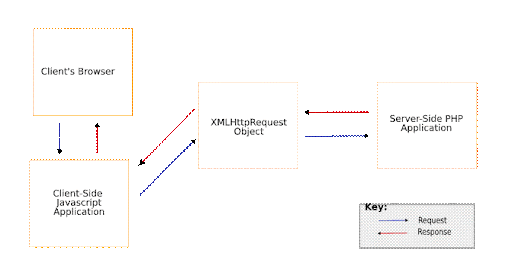
As PHP developers, it might seem tempting to avoid the use of Javascript and leave it to the dsigner. After all, we aren't usually programming the UI, but the processing components required by the UI. The distinction between the two is disappearing. Here's a simple diagram that demonstrates just how AJAX works:

If you're working for a small or medium sized company interested in implementing AJAX solutions, you might end up responsible for figuring out how.

XMLHttpRequest objects can be a simple way of getting data to and from a PHP application while keeping your client right at home on the same page. Our example today will allow a user to select a specific piece of software that your company makes. We will show a selection box with several categories. When a user selects a category, a request is sent to a PHP application which returns a list of applicable software. The information is used to generate a list of the results underneath the selection box. Since the information is not loaded with the initial page, your company saves bandwidth, and because the user doesn't have to bounce from page to page for results, he will find your company's page more inviting and faster to load.

Javascript for PHP Programmers

Since we'll be working with Javascript, it's good to get a basic tutorial given a background in PHP.

Variables:

Variables in javascript are declared in much the same was as in PHP. To declare a variable in javascript, use the following:

 
[javascript code]
 
var varname = varvalue; //Declaring your variable is not mandatory, but good practice.

Variables:

Variable types are handled loosely, as they are in PHP.

Control Structures:

PHP and javascript have a very similar way of using these as well... You can use if/else statements, switch statements, for and while loops and nested loops all with PHP syntax. If/elseif/else statements are a little different, but not much:

 
[javascript code]
 
var variable1 = 1; //Declare a variable.
if(variable1 == 1){ 
        // Increment variable value by 1
        variable1++;
        /* The following brings up a message box, a handy way of checking variable values as you
                               go. Be careful not to use these in loops that are too long. */
        alert(variable1); 
}else if(variable1 == 2){ //Elseif's in javascript require a space between the else and if.
        for(i=0;i<20;i++){ //For loop.
               variable1++;
        }
        switch(variable1){ //Switch conditional
               case 22:
                       alert("variable 1 has value of 22!");
                       break; 
               default:
                       alert("didn't have value of 22!");
                       break;
        }
}else{
        alert('The final else statement');
}

Functions

To declare a function in javascript, use the following:

 
[javascript code]
 
function functioname(argument1, argument2, argument3){
        /* Arguments not provided will be null */
        if(argument3 == null){
               return argument1 + argument2
        }else{
               return argument1 + argument2 + argument3
        }
}
/* And call it with */
alert(functionname(1, 2)); //returns 3
/* or */
alert(functionname(1, 2, 3)); //returns 6

Other than the difference with default values for optional arguments, you should assign a default when a passed argument has a null value.

Using Javascript in a Document:

Javascript can be included in your document in two ways, similar to CSS inclusion:

 
[HTML code]
<!--Placing your javascript in the head tag of your html document is the standard-->
<script language="javascript" type="text/javascript" src="./javascript_file.js"></script>
<script language="javascript" type="text/javascript">
 
        /*Javscript code goes in here*/
        alert("Hello World!");
</script>

The first way is to link to the file directly, and the second is to include it on the page itself. If your code is getting long and is used on multiple pages, it is preferable to use the first method, as the browser will cache the file for future use. And that's all you need to know about Javascript to continue.

Developing the Initial Page

Below we're going to be creating the page the user loads to view your companies products.

 
[HTML code]
<html>
        <head>
               <title>CompanyXYZ Software</title>
               <script language="javascript" type="text/javascript" 
                       src="./internal_request.js">
 
               </script>
        </head>
        <body>
               <div id="product_categories">
                       <!--Category selection box...-->
                       <form name="form_category_select">
 
                               <select>
                                      <option>Audio</option>
                                      <option>Games</option>
                                      <option>Internet</option>
 
                               </select>
                       </form>
               </div>
               <div id="product_cage">
                       <!--This is where we'll be displaying the products once they're loaded-->
                       ^ Please select a category from above.
               </div>
 
        </body>
</html>

The above HTML first links to a javascript file, internal_request.js, and displays a page with two <div> tags, the second of which is where we'll be displaying our data. Go ahead and copy the above code into a file called products.html.

Creating the XMLHttpRequest Object

The XMLHttpRequest object works differently in Internet Explorer and Mozilla-like browsers. To create an XMLHttpRequest object in IE, the following can be used:

 
[javascript code]
 
var request_o = new ActiveXObject("Microsoft.XMLHTTP");

And the following works for supporting browsers other than IE:

 
[javascript code]
 
var request_o = new XMLHttpRequest();

Determining what browser you are working with and creating the appropriate object is simple:

 
[javascript code]
 
/* The following function creates an XMLHttpRequest object... */
 
function createRequestObject(){
        var request_o; //declare the variable to hold the object.
        var browser = navigator.appName; //find the browser name
        if(browser == "Microsoft Internet Explorer"){
               /* Create the object using MSIE's method */
               request_o = new ActiveXObject("Microsoft.XMLHTTP");
        }else{
               /* Create the object using other browser's method */
               request_o = new XMLHttpRequest();
        }
        return request_o; //return the object
}
 
/* You can get more specific with version information by using 
        parseInt(navigator.appVersion)
        Which will extract an integer value containing the version 
        of the browser being used.
*/
        

Copy the above code into a file called internal_request.js, located in the same directory as the products.html file.
We now have a function that will create an XMLHttpRequest object in internal_request.js, and we have an HTML file that calls upon the code in internal_request.js. Remember how we left the product selection <div> in products.html blank? Let's write the code that utilizes our createRequestObject function to get the list of products.

[javascript code]
 
/* The variable http will hold our new XMLHttpRequest object. */
var http = createRequestObject(); 
 
/* Function called to get the product categories list */
function getProducts(){
        /* Create the request. The first argument to the open function is the method (POST/GET),
               and the second argument is the url... 
               document contains references to all items on the page
               We can reference document.form_category_select.select_category_select and we will
               be referencing the dropdown list. The selectedIndex property will give us the 
               index of the selected item. 
        */
        http.open('get', 'internal_request.php?action=get_products&id=' 
                       + document.form_category_select.select_category_select.selectedIndex);
        /* Define a function to call once a response has been received. This will be our
               handleProductCategories function that we define below. */
        http.onreadystatechange = handleProducts; 
        /* Send the data. We use something other than null when we are sending using the POST
               method. */
        http.send(null);
}
 
/* Function called to handle the list that was returned from the internal_request.php file.. */
function handleProducts(){
        /* Make sure that the transaction has finished. The XMLHttpRequest object 
               has a property called readyState with several states:
               0: Uninitialized
               1: Loading
               2: Loaded
               3: Interactive
               4: Finished */
        if(http.readyState == 4){ //Finished loading the response
               /* We have got the response from the server-side script,
                       let's see just what it was. using the responseText property of 
                       the XMLHttpRequest object. */
               var response = http.responseText;
               /* And now we want to change the product_categories <div> content.
                       we do this using an ability to get/change the content of a page element 
                       that we can find: innerHTML. */
               document.getElementById('product_cage').innerHTML = response;
        }
}

The above code should be appended to what you already have in the internal_request.js file.

Conclusion

We'll followup with the rest of this informative article next week, so be sure to visit us again for the conclusion! btw, don't miss the important Quick Tips listed below!

Quick Tip 1: (Using the POST method instead of GET):

The following will send the request to the PHP file using the POST method:

 
        http.abort;
        http.open('post',  'back_end.php');
        http.setRequestHeader('Content-Type', 'application/x-www-form-urlencoded');
        http.send('arg1=val1&arg2=val2&arg3=val3');

Quick Tip 2: (Parsing XML results):

If you're receiving XML instead plain-text results from your processing PHP script, you can use the javascript DOM to parse them. Suppose you receive the following:

 
        <product_list>
               <product id="1">
                       <name>EeasySMS</name>
                       <version>2.2</version>
               </product>
               <product id="2">
                       <name>BabyMon</name>
                       <version>1.2</version>
               </product>
        </product_list>

To receive a DOM compatible response from our XMLHttpRequest object, instead of using the responseText property, substitute the responseXML property. In this case we'll refer to it by assigning it the variable XMLResponse.

The product_list element contains two elements of interest: product elements. In order to get to these, we can use the following:

 
/* Reference the product_list element to the variable product_list */
product_list = XMLReponse.getElementByTagName('product_id');
 
/* By substituting product_list for XMLResponse, we will be searching
        only the product_list element, not the entire response 
        We also use getElementsByTagName, not getElementByTagName, 
        since we are interested in all of the results, not just one. */
 
product_id = XMLResponse.getElementsByTagName('product');
 
/* getElementsByTagName produces an array, which we can access  like this:
        product_id[n], the same way we access an array item in PHP. 
        Let's get the id attribute from the product elements like this: */
 
for(i=0; i<product_id.length; i++){ //length is the same as count($array)
        id = product_id[i].getAttribute('id') //Grabs the id attribute.
        /* To get the text from within a text node, we use firstChild.data
               for the corresponding element. */
        name = product_id[i].getElementByTagName('name').firstChild.data;
        version = product_id[i].getElementByTagName('version').firstChild.data;
}

This may seem like a bit to work with at first, but with a little work, you can get what you want to work. If you want to avoid this, you could use the responseText method, parsing the XML in PHP before sending it to the XMLHttpRequest object.

Quick Tip 3: (Relevant Links):

Thursday, May 8, 2008

Spry framework for Ajax

Ajax for Everyone

Spry is a JavaScript-based framework that enables the rapid development of Ajax-powered web pages. Not a JavaScript guru? No problem. Spry was designed to feel like an extension of HTML and CSS, so anyone with basic web-production skills can create next-generation web experiences by adding the power of Ajax to their pages.

Spry can be used with any server-side technology (ColdFusion, PHP, ASP.Net etc.). By building the front-end of your web application with Spry you enable a more efficient designer-developer workflow by keeping UI separated from back-end application logic.

Spry 1.6.1—Ensuring Adobe AIR compatibiity

With Spry 1.6.1, the latest release of Spry, you'll get features, samples and documentation that enable you to add Ajax goodness to your pages without having to sacrifice adherence to web standards or best-practices. We have also made changes to the framework to ensure that we work well in the Adobe AIR space.

Spry in a Nutshell

  • Spry is implemented as a set of JavaScript libraries. To use Spry on a page, simply include the JavaScript library that contains the Spry features you need, use those features on your page, and then deploy that JavaScript file to your site along with your page.
  • Spry has three parts: Spry Data, Spry Widgets and Spry Effects. They can be used together or independently of one another.
  • No browser plug-ins or server-side modules are required for Spry to work.
  • Dreamweaver CS3 has features that ease the development of Spry pages but Spry itself is completely tool-agnostic. Any code editor can be used to develop Spry pages.

Widgets

  • Spry widgets are advanced web components expressed in basic HTML markup, CSS and a little JavaScript.
  • Customization and styling is easily done using your existing HTML & CSS skills.
  • Spry widgets are accessible. They respond to keyboard navigation and degrade gracefully when JavaScript its turned off.

Check out the Spry Widget samples

Data

  • The Spry Data set transforms complex data sources into a familiar row/column format that can be placed anywhere within your page.
  • Supported data sources include XML, JSON and HTML
  • Easily add Dynamic Regions to your page that control retrieval and placement of data without writing any JavaScript.

Check out the Data set and Dynamic Region samples

Effects

  • Spry effects allow you to add smooth and graceful transitions to almost any element on your page
  • A single line of JavaScript is used to add an effect to your page.
  • Effects can highlight information, create animated transitions, or visually alter a page element for a certain period of time

Check out the Spry Effects samples

Spry Primer

Spry is an easy-to-use Ajax toolkit, made for designers and developers both. While it is simple to get started, there are a few concepts that, once familiar with, will make building Spry page easy.

This document will outline the high level concepts of Spry and link to more detailed information and samples.

Goals of Spry

Spry was started because most other Ajax frameworks out there can be quite complex; hard to get started, many dependent files and markup injection, making it hard to style and edit. We thought there was an easier way.

Spry leverages what you already know: HTML and CSS and some javascript, and uses custom attributes or small constructor scripts, to activate the functionality. The framework does most of the heavy lifting.

We try make sure that it is easy to customize. We provide simple CSS with clear class name as hooks for customization. If you want to set the size of the accordion, just set the width on the class, as you would normally set the width, or any other property, of an element.

An important idea for Spry is to not inject markup. This means that all the HTML code that is needed is actually on the page, not buried within a <script> tag. This makes it easy to figure out the generated code and it makes the HTML easy to edit and style.

The 3 Parts of Spry

Spry consists of 3 main parts:

  • Data - Using XML, JSON or HTML data to populate the page.
  • Widgets - Advanced page functionality using simple markup. Accordion and Sliding Panels are examples of widgets.
  • Effects - Add polish to the page by moving, showing and hiding elements on the page. Slide and Fade are examples of Effects.

Data

Spry Data was the first piece of Spry to be released and it is probably the most powerful part of the framework. It has two main concepts:

  1. Retreiving the data.
  2. Using the data on the page.

Pulling in the Data

First, to use Spry Data, you need to attach the core Spry javascript files to your page. The exact files you will need depend on the data source type, but all data sets use SpryData.js. These files are in the 'includes' folder in the Spry zip.

Spry has the concept of a 'data set'. This is data pulled in from XML, JSON or HTML files and converted into a table (a javascript object), with rows and columns, like a database table. The end result of the data set is the same, no matter what the data type is.

To this data set, you can specify some attributes or behaviors. By default, Spry downloads the data file, XML for instance, once and uses that to build the data set. We cache that data: If you want to get new data from the server directly, you can turn off the cache and tell Spry to get new data every 5 seconds, for example. These can be set as options in the constructor. The constructor is the script where the data set is defined.

A basic data set constructor looks like

<script>
var ds1 = new Spry.Data.XMLDataSet("folder/products.xml","products/product");
</script>

where the first value is simply the path to the XML source. The second value is the XPath into the XML file. This defines where you want to start pulling in data. XPath is explained well here.

The var name 'ds1' is the data set name and it is used in many places within a standard Spry page.

Any of our Data samples will have a data set defined.

You can have multiple data sets on a page. These data sets can depend on other data sets. Data set types can be mixed: you can have one XML data set and one JSON data set, for example.

If your are using XML as your data source, this can come from a XML file, or any file that generates XML. This can be Coldfusion, PHP or anything else that generates valid XML; Spry doesn't care where the data comes from.

Once the data set is created, it can be used on the page.

Spry Regions

The second half of the Spry data concept are Spry regions. Spry regions are elements on the page where Spry processing happens. These elements are denoted by custom attributes applied to elements on the page.

A basic Spry region looks like <div spry:region="datasetname"></div>. Spry regions can be used with most HTML tags.

This custom attribute tells Spry to look within this <div> for things to process. There are 2 things to process:

  1. Other spry attributes
  2. Data references.

There are Spry attributes for logical processing, things like 'spry:if' and 'spry:when'. There are also Spry attributes for behavioral things like 'spry:hover' which applies a CSS class to the element when the user mouses over the element.

Data references are used to add the data set data to the page. These are placeholders for the real data. A data reference is the data node name, wrapped in curly braces {}. For example, with this XML as a data set:

<products>
<product id="1">
<name>Photoshop</name>
<category>Digital Imaging</category>
</product>
</products>

Our data references are the node names wrapped in curly braces, therefore, we would have Spry code that looks like:

There is a spry:region because all Spry processing happens within a spry:region. Then we have the data references within the region. When the page is loaded in the browser, the output would be the first values in the XML file: Photoshop 1 Digital Imaging

So the most basic Spry data page would look like:

<html xmlns="http://www.w3.org/1999/xhtml">
<head>
<meta http-equiv="Content-Type" content="text/html; charset=utf-8" />
<title>Spry Page</title>
<script src="SpryAssets/xpath.js" type="text/javascript"></script>
<script src="SpryAssets/SpryData.js" type="text/javascript"></script>
<script type="text/javascript">
var ds1 = new Spry.Data.XMLDataSet("data/adobe_products.xml", "products/product");
</script>
</head>
<body>
<div spry:region="ds1"> {ds1::name}</div>
</body>
</html>

A note here about data references. Notice in the example above, it is written {ds1::name}. This is the formal way of writing data references. In a scenario where you have multiple data sets, there might be more than one {name} column. Prepending the node name with the data set name and 2 colons is used to specify the data set it comes from.

If you want to use multiple data sets in one region, simply add the data set names to the spry:region attribute, separated by a space. The Master Detail sample uses 2 data sets.

<div spry:region="ds1 ds2">
{name}{ds2::name}
</div>

In this case, 'ds1' is listed first. That means you can use either the short or the formal data references for that data set. Any other data sets listed in the region must use the formal data reference form.

We mentioned above that you can have data sets from XML, JSON or HTML. The region part of the page does not care where that data comes from. The data references are all written the same way, regardless of the data source. All the spry:attributes work the same way, no matter what the data set is.

There are other Spry attribute for controlling the look and the flow of the page. For instance, a common Spry attribute is 'spry:if'. This is used to determine whether to show a part of the page, depending on a condition. A sample:

<div spry:region="ds1 ds2">
<span spry:if="{name} == 'Photoshop'">{name}{ds2::name}</span>
</div>

The value of the spry:if attribute is a javascript expression that equals 0 or 1 (true or false). Above, we are checking to see if the value of the {name} data rerefence is 'Photoshop'. If it is, that <span> would be printed on the page. If it is not equal, that <span> would not be displayed.

There are also attributes like 'spry:hover'. This applies the specified class name to the element when the mouse is over the element.

<style>
.redBG{background-color:red;}
</style>
...
<div spry:region="ds1 ds2">
<span spry:hover="redBG">{name}</span>
</div>

When the mouse is over the <span> tag, the 'redBG' class will be applied and turn the background color to red. When the mouse leaves the <span> the class will be removed.

With a combination of Spry attributes and data references, a high degree of control can be used on the page with a small amount of markup.

Learn more about Spry Data

The Data Set Overview describes in detail the flattening/XPath idea, advanced data set options and region concepts. A good read for learning Spry concepts.

The Dynamic Table document goes over building a basic Spry table.

See the Data/Region samples.

Read the XML Primer. This describes the basic concepts of XML.

Read the JSON Primer. The JSON data set overview.

The HTML data set overview. Describes how to use HTML tables as data sets.

The Data API describes all the features of the data capabilities.

Spry Widgets

Spry widgets are pieces of advanced page functionality encapsulated in regular HTML markup. Many are familiar with Accordions and Tabbed Panels. Spry also has widget like Sliding Panels and Collapsible Panels.

We refer to these as 'disclosure widgets', because content is hidden and 'disclosed' as users click into other panels. We also have form validation widgets like Checkbox and Text Field validation.

Widget Philosophy

The idea behind Spry widgets is that the widget structure is defined in HTML on the page. Then a small constructor script is used to convert that markup into the functioning widget.

For instance, the Collapsible Panel markup is the most basic:

<div id="CollapsiblePanel1" class="CollapsiblePanel">
<div class="CollapsiblePanelTab" tabindex="0">Tab</div>
<div class="CollapsiblePanelContent">Content</div>
</div>
<script type="text/javascript">
var CP1 = new Spry.Widget.CollapsiblePanel("CollapsiblePanel1");
</script>

Widgets have a container tag around them which defines for Spry where the widget begins and ends. These container tags have an ID defined that Spry uses to identify the widget markup.

For the Collapsible Panel, there is a tag for the tab and a tag for the content panel. Within these structure tags, you can put in any HTML you wish. Spry just needs to have that main structure correct.

The constructor script comes after the widget markup. This is because that markup needs to exist before Spry executes the script to create the widget.

The constructor defines a variable for the widget name ("CP1"). We then pass the ID of the widget container to the constructor ("CollapsiblePanel1").

We can set options for the widget (for Data, Widgets and Effects) by adding the options to the constructor. The syntax is ,{option:value, option:value}. For instance, instead of having the Collapsible Panel smoothly open and close, we can turn off the animation by passing an option in the constructor.

<script type="text/javascript">
var CP1 = new Spry.Widget.CollapsiblePanel("CollapsiblePanel1",{enableAnimation:false});
</script>

Most widgets have behaviors defined that allow control of the widget from other parts of the page. For instance, we can create a text link that will open or close a Collapsible Panel.

<a href="#" onclick="CP1.open();">Open the Panel</a>
<a href="#" onclick="CP1.close();">Close the Panel</a>

Most widgets will have a number of functions for these sorts of operations, depending on the complexity of the widget.

Learn More about Widgets

The Widget Model document describes in more detail the widget ideas presented here.

Each widget has an overview document. See them here.

Effects

Effects are combinations of javascript and CSS that cause page elements to change appearance, size or position. See the Effects demo for a sample of each Effect.

All the effects are contained within the SpryEffects.js file. This file should be included on your page if you want to use the effects.

Effects work by first defining the effect as a javascript object. Then add functions to your page to start or stop the effect. A simple effect looks like:

<div id="fadeMe">Fading...</div>
<a href="#" onclick="myEffect.start();">Fade it</a>

<script>
var myEffect = new Spry.Effect.Fade("fadeMe",{from:100, to:0, duration:1000, toggle:true});
</script>

Note that again, the constructor scripts come after the markup.
Here we define an Effect called 'myEffect'. This is the name we use to control the effect. In the constructor, we specify the ID of the element we will fade: "fadeMe". We then list the options:

  • from: the starting opacity
  • to: the final opacity
  • duration: how long to complete the effect, in milliseconds.
  • toggle: Tells the effect to reverse when clicking the link again.

In the <a> we call the 'start' method that starts the effect: onclick="myEffect.start();".

The effects list contains base effects and combination effects. Base effects are simple animators: Move, Size, Opacity or Color. All other effects, like Puff, are combinations of these base effects.

For more advanced effects, there are Cluster effects. Users can take our base effects and combine them into groups. These groups can be run in parallel or in sequence. The demo has 2 examples.

Learn More about Effects

The Effects Coding document describes each effect and all their options.

Advanced Spry

Spry can do more than what is described here.

We have functions for:

and more...

Friday, September 21, 2007

Asynchronous JavaScript And XML (AJAX) -- And Why It's Not Enough

Asynchronous

AJAX applications typically use XMLHTTPRequests, a communication feature built in to modern browsers such as Mozilla/Firefox and IE.

Ironically, the real value in XMLHTTPRequest isn't that communication can be asynchronous. Form submissions, the previous way of handling server communication, were and still are asynchronous. XMLHTTPRequest actually makes it possible to support _synchronous_ calls and provides a single unified way to make either type of call.

Most writings on AJAX would have you believe that's enough -- make an asynchronous call, get an AJAX application. Unfortunately, as anyone who's done much programming with asynchronous calls (aka threads) can tell you, making the call is the easy part -- it's coordinating the results that's hard. A simple real world example highlights "the sync problem".

The Sync Problem

Its a common client-side requirement to fetch a template containing static data along with dynamic data from a web service call, blend them into a single UI element, and then display that element in a portion of the user's currently displayed page. In this common case you've got two separate data sources meaning you have two separate calls whose results have to be blended only after both complete. When confronted with this reality most developers switch to making synchronous calls (taking advantage of XMLHTTPRequest's truly new feature to "cheat"). If you decide to hang in there and stay with the asynchronous call format that's great, but we've yet to see a single AJAX toolkit that offers you any kind of multiple-request coordination -- so you'll end up writing the synchronization logic yourself.

If you use TIBET its simple:

// set up two requests to make the async calls (you can have more if you like)
request1 = ServiceRequest.create(dc('async',true,'other','parameters'));
request2 = ServiceRequest.create(dc('async',true,'some','parameters'));
// create a function to observe the completion signal we'll be sending below
response = function(aSignal) { alert('The requests are done'); };
// create an "And Join" saying both need to complete (TIBET also supports "Or Joins")
join = TPAndJoin.create('AllDone');
join.addObservation(request1);
join.addObservation(request2);
// tell our response function to observe the signal our join will send
response.observe(join, 'AllDone')
// activate the requests...TIBET handles the rest
request1.activate();
request2.activate();

Since TIBET was built before you could "cheat" via XMLHTTPRequest it's been designed to support asynchronous event coordination from the start. TIBET uses event signaling and a set of types based on the Workflow Management Coalition's petri-net models for workflow event coordination to handle event synchronization. Because it uses events rather than XMLHTTPRequest callbacks you can use the previous example's pattern to join responses from both the server and the user since interactions with the user are asynchronous as well.
Simply put you won't find a better library for managing the full spectrum of asynchronous browser behavior than TIBET.

The URI Problem

One of the core problems in building web applications is the fact that URI paths often have to be fully-specified. While relative URI addressing solves some of the issues, it's all too common to find yourself working with pages and source code that use full URI paths...and that's a real problem.

Whether you're relocating an application, deploying a demonstration copy, trying to develop against a test server, pushing a release to production, or simply supporting developers on multiple platforms if you can't support a flexible URI specification model you'll end up with maintenance headaches.

TIBET solves the URI problem through a number of mechanisms.

First, TIBET supports a unique ~ (tilde) syntax reminiscent of Unix paths (think "home"). TIBET will automatically adjust ~ paths to reference the current application or library "home" so that all your URI references resolve _without code changes_ -- even when you switch between file and http-based launch models. You can also create your own variables as reference points. For example you can define XSLT_HOME and then reference ~XSLT_HOME/somefile.xsl as a way of keeping your URI paths organized yet flexible.

Second, TIBET lets you map URIs using a configuration file that supports a variety of important features including user and role-specific aliasing, development-mode (devl, test, prod) aliasing, and custom load and storage handlers. Using TIBET you can write code that references ~/foo.html and map that URI to different concrete URIs based on user, role, and mode. Then you can define different load and storage handlers to let you customize how data is managed, including building server simulations so you can develop in complete parallel while the server team builds out your web services support layer.

Third, TIBET supports local cache management built on top of standard HTTP header information combined with industry-standard duration syntax. Using TIBET you can define local stores for common lookup tables, leveraging the standard HTTP expires header data or overriding it with a duration. For example, you might say that ~/lookup_codes.xml should be stored locally at /usr/local/dat/lookup_codes.xml and updated with a duration of P7D (every 7 days). You'd combine this with an alias for ~/lookup_codes.xml that says read from that local store. Now your application only loads that data over the network once a week. Want to change it? Just update the cache entry for the cache file itself and a new set of rules will be delivered.
We can't imagine a web framework that doesn't include types for such fundamental web constructs as URIs, but again, we've been surprised to find most AJAX toolkits don't make much use of OO, and when they do they neglect fundamental types like URI. TIBET's TPURI type and it's various subtypes build on top of our cross-platform URI primitives to give you a complete set of Object-Oriented types and methods for URI management.

The HTTP Problem

Most writings on AJAX limit their discussion to HTTP's two main verbs: GET and POST, but there are 5 others (PUT, DELETE, HEAD, OPTIONS, TRACE) and they can have real value for serious application developers. Unfortunately few AJAX toolkits offer support for HTTP's full verb set. In fact, GET and POST are supported via Form submission so if you're just going to do GET/POST in an asynchronous format you've gained almost nothing over what browsers have been able to do for a decade.

To get full value out of XMLHTTPRequest you need to be able to control both the command verb and the HTTP headers that are sent so you retain control over how calls are made and how the server is likely to respond to them. You also need complete control over data encoding so you can adapt as needed to the various services you may have to integrate with. As with "The Sync Problem" this is another area where most AJAX toolkits fall down on the job.
Dealing with the full spectrum of HTTP and HTTPS options, as well as things like redirects is critical to any Enterprise-Class solution.

TIBET Low Level Protocols

TIBET leverages XMLHTTPRequest as do most true AJAX offerings, however TIBET adds a set of fully-instrumented cross-browser primitives for "low level" web and file-based data communication including support for two protocols not normally associated with AJAX, namely WebDAV and local file access.

This gives TIBET a core set of transport protocols that include:

HTTP(S)
WebDAV
FILE://

Since you may need your applications to run from either HTTP or file URIs TIBET layers a second set of primitives on top of the standard HTTP and file primitives so you can invoke a common "load", "save", "lastModified" API that insulates you from the specifics of where the application was hosted. These are our URI primitives and they're the foundation of our solution to "the URI problem".

TIBET's low level protocols can be further enhanced by leveraging TIBET's built-in SHA1, MD5, and 256-bit AES encryption capability, allowing you to secure your most sensitive data end-to-end or to support authentication protocols such as digest-based authentication which can help avoid putting passwords or other data in clear text over the wire.

TIBET Web Service / Enterprise Protocols

Layered on top of those core transport protocols TIBET adds support for today's common web service and Enterprise service protocols. While several AJAX offerings offer SOAP support, TIBET adds support for several protocols which are equally valuable including:

SOAP
XML-RPC
REST (CGI)
XMPP (Jabber)
RSS
DSML (Directory Services Markup Language)
NNTP (Network News Transport Protocol)
With TIBET you can build applications that can speak to virtually any data source, not just those with a SOAP API.

TIBET Prebuilt Service Proxies

Low-level function calls are all well and good and TIBET provides some of the most comprehensive around, but for ease of development TIBET encapsulates access to each of our supported data formats behind Service, Request, and Response types you can subclass for specific web services for maximum reuse and maintainability. With TIBET's support for Web Services Description Language (WSDL) you can even generate Service, Request, and Response types from a WSDL file to help your development go even faster.

TIBET ships with sample service wrappers for:

Google
GMail
Zoe
Amazon
Blogger
Syndic8
Meerkat
XIgnite
More...

Of course, TIBET's Request and Response types are designed so they work identically regardless of whether you're making a synchronous or asynchronous call. You implement a simple result handler for your request and TIBET will make sure it's invoked at the proper time.

TIBET Real Time Collaboration / Workflow

The full scope of TIBET's support for asynchronous data is most visible in our XMPP (Jabber) module. TIBET includes a complete set of types for interacting with XMPP servers. That means you can seamlessly integrate presence information, instant messaging, or distributed events with your client-side applications.

With TIBET you can build applications that send and receive XMPP packets in near-real-time. Arrival of new packets triggers automatic notification of XML Event-based listeners, allowing you to create data-driven, collaborative, workflow-oriented applications using W3C and IETF approved XML standards. Sending a packet to an XMPP targeted resource allows you to message other services or users in real time.

TIBET's development tools provide an example of this functionality by including an XMPP "shell", an interactive chat console that makes use of the XMPP library components to instantly connect you with other TIBET developers world-wide. That's just one example of the power of XMPP and TIBET.

In short, if you're looking to build Enterprise-Class applications that leverage asynchronous data you can't do better than TIBET.

JavaScript

At the center of AJAX is JavaScript but, as many of us learned the hard way, doing Enterprise Class code in JavaScript is difficult and time-consuming. Simply giving DHTML programming a new name didn't magically upgrade all our web browsers ;). It's still hard work.
In addition to well-known issues of cross-browser consistency (or lack of it), JavaScript's support for object-oriented programming is limited and features and tools necessary to support fast development while ensuring quality such as error logging (ala Log4J), unit testing (ala JUnit), and interactive development tools (ala Eclipse) are often non-existent, even among commercial AJAX and "rich client" offerings.

TIBET -- Fixing JavaScript In JavaScript

To make JavaScript truly Enterprise Class TIBET adds a number features built from the bottom up in a layered architecture that includes:

200+ compatibility "primitives" for JavaScript, XML, and XSLT processing, giving you a single, cross-browser API foundation

a powerful XML logging layer and component-specific filtering and leveling, allowing you to constantly monitor activity

encapsulation including set() and get() calls with state change notification, giving you support for full data-driven design

object-oriented support including an XML-based meta-object system with reflection, maximizing reuse and flexibility

unified DOM Level2 and XML Events-compliant event handling, removing complexity and adding true MVC support

powerful URI, Node, and Service/Request/Response types, unifying how you access both data and UI elements

using XInclude, XMLBase, XSLT, and XPath, supporting extensible modular development
a powerful object-oriented scripting layer that lets you script all of this power using Unix-like pipes and redirection

While this may sound like a lot of overhead, TIBET application packages are typically less than 256K in size, load once on browser startup, and can launch in as little as 5 seconds -- faster than many desktop apps. Your users experience a short delay at the start of their work day, then get the performance benefits of enhanced caching and data management along with insulation from network and server failures all day.

TIBET Development Tools

To support the requirements of Enterprise Class development schedules, TIBET is augmented with powerful development tools for creating browser-based applications including:
a fully-interactive browser-based IDE, the TIBET Application Portal (TAP™), giving you point-and-click development interactive xslt and xpath visualization tools to support your XML-based development processes a powerful UNIX-like command shell with full runtime code access, letting you manipulate your running applications reflection-based unit testing as well as a complete port of the xUnit APIs, helping you ensure quality at every step If you're sick of hitting Reload then you need TIBET. Found a bug on page 3 of your application? With TIBET you simply ESCAPE to bring in the TAP tools, fix the bug interactively, then save your fixes back to any WebDAV server or your local file system. With any other approach you have to exit, edit the source file, recompile the page, relaunch the app, re-enter data on pages 1 and 2, then hope you fixed it. Lather, rinse, repeat. We call it "Reload Hell" and with TIBET it's a thing of the past along with those dreaded "Preview in Browser" steps.

Using TIBET's tools is like working in an environment combining the best of NeXT's (Apple's) Interface Builder, the best of Squeak, and the best of Unix.

Perhaps best of all, you can get most of the advantages of the TAP even when building non-TIBET applications. Your native JavaScript, DOM, CSS, and XHTML are all accessible to TIBET's tools regardless of whether you're including code from the TIBET Development Kit (TDK).

and XML

The final element of AJAX is "and XML". TIBET supports XML "and how!". While modern browsers like Firefox and IE, and hence most AJAX toolkits, provide baseline XML support they fail to provide consistent support for that baseline and often don't support important standards for Enterprise Class authoring like XML Events, XInclude, or XMLBase that let you modularize your development.

TIBET provides cross-browser support for the following XML standards without applets, plugins, or server add-ons:

XInclude
XML Base
XML Events
XML Schema (all 46 built-in types)
XPath (plus extension functions)
XSLT (including parameterized sheets)
XForms
SOAP
XML-RPC
XMPP
DSML
RSS

With TIBET, XML support is built in from the bottom up. TIBET takes internal advantage of XML in these areas:

TIBET Boot System - "Ant" formatted XML files describing application modules, scripts, and inline code to load

TIBET Metadata - XML formatted data suitable for XSLT into OMG-standard XMI format for OO diagramming

TIBET Logs - stored in XML suitable for XSLT filtering and formatting for debugging or other uses

TIBET Signals - W3C standard XML Events-compliant XML including fast-loading persistent registrations in XML

TIBET XMPP - IETF standard messaging and presence for pub/sub, distributed events, workflow, and IM

TIBET Shells - XML-based history, snippet, and other environment data storage for sharing / manipulation

On top of this foundation, TIBET allows you to create your own XML-based custom tags and XSLT chains, meaning you can model common application elements or blocks of complex XForms/XHTML markup in simple reusable "macros" that are processed client-side. When you're trying to build complex Enterprise Class applications this can mean hundreds of hours of saved effort.

There's no other product, open or closed source, that can match TIBET for XML support in a web browser.

SUMMARY

Thanks to "AJAX" JavaScript and XML are getting a lot more attention -- and that's a good thing. Unfortunately, our experience has shown that unless you're able to spend a lot of time fighting cross-browser issues, browser bugs, and a severe lack of interactive development tools you'll find your AJAX projects failing to meet their delivery goals on time and under budget.
If you leverage TIBET in your projects you'll have the benefit of the web's most interactive development lifecycle and the web's most comprehensive JavaScript/XML framework. We've spent the past 6 years "writing JavaScript so you don't have to" -- and while others may still want to call it AJAX we'd rather just call it TIBET.